PRODUCT DOCUMENTATION
Get started with volume calendars & audio levels.
Set a useful default
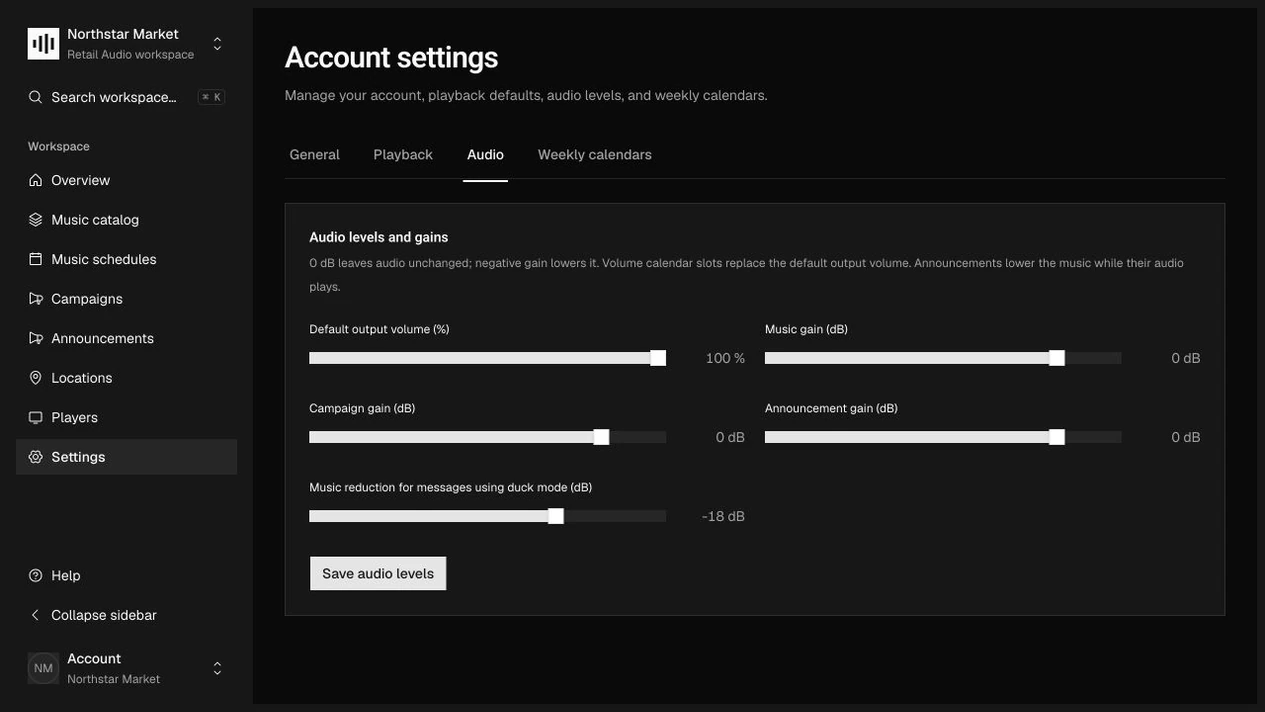
Open Settings → Audio. Set Default output volume (%) and the separate Music gain (dB), Campaign gain (dB), and Announcement gain (dB) values. Choose Save audio levels to save the account defaults.
Schedule volume changes
Open Settings → Weekly calendars and add a volume slot. Choose its weekday, start and end times, and output percentage. Copy recurring slots to other weekdays, then save the volume calendar.
Make an exception for one zone
Open an audio zone under Locations. Add a local volume slot or explicitly override an audio setting. Leave other fields inherited so future account changes continue to reach that zone.
Balance spoken messages
Set Music reduction during announcements (dB) to control ducking. Review the resolved calendar and test the levels on the intended player and sound system before relying on the settings in a store.
How it works.
Percentages and gains do different jobs
Output volume ranges from 0% to 100%; zero mutes all content. A calendar percentage replaces the effective default percentage rather than multiplying it. Content gains remain independent and range from −60 to +12 dB.
What gaps inherit
A zone calendar overrides account volume only inside its slots. Gaps inherit account slots, then fall back to the zone’s effective default output level. Clearing a field override restores inheritance; an explicit zero remains a real override.
Announcement ducking
Ducking ranges from −60 to 0 dB and defaults to −18 dB. It adds attenuation to the underlying music during announcements; it does not reduce the announcement itself or replace its own gain setting.
Work through the API.
The same workflow is available through the core HTTP API. Paths below are relative to your core API origin. Your installation serves the full request and response schemas at /docs/ and /openapi.json.
| Method | Endpoint | Purpose |
|---|---|---|
PATCH | /v1/account | Merge individual default audio values through the audio object. |
PUT | /v1/account/volume-calendar | Replace the account’s weekly volume slots. |
PUT | /v1/zones/{id}/volume-calendar | Replace the volume override slots for one zone. |
GET | /v1/zones/{id}/calendars | Read account slots, zone overrides, and resolved weekly segments. |
Things to know.
- Calendar slots cannot overlap within the same calendar and must remain within one local day; use a second slot for overnight periods.
- The server saves and resolves levels. A player must apply them, ramp changes, and prevent clipping in its mixer; platform engines remain in development.